

All your mailboxes in one safe app
Mail warns you about typical scam tricks before you pay or click. For Android and Windows.


Ready for Gmail 2027
Your other mailboxes keep working. Google Help
Encrypted inside the app
Saved letters locked with AES-256.
Fingerprint lock
Opens only with your finger, face or PIN.
Hidden from screenshots
And from the recent-apps preview.
Warns about changed bank details
Before you pay an invoice.
Checks every link
Shows where it really leads.
All mailboxes in one
One inbox, one spam folder.
No ads, no subscription
Pro is one payment of 9,99 €.
Mail warns you before you click or pay
Every letter is checked right on your phone. You see the warning in plain words.
Fake sender
A known name with someone else's address behind it.
The name says bank-demo.se, but the letter comes from a different addressLinks that lead somewhere else
Before a suspicious link opens, Mail shows where it really goes.
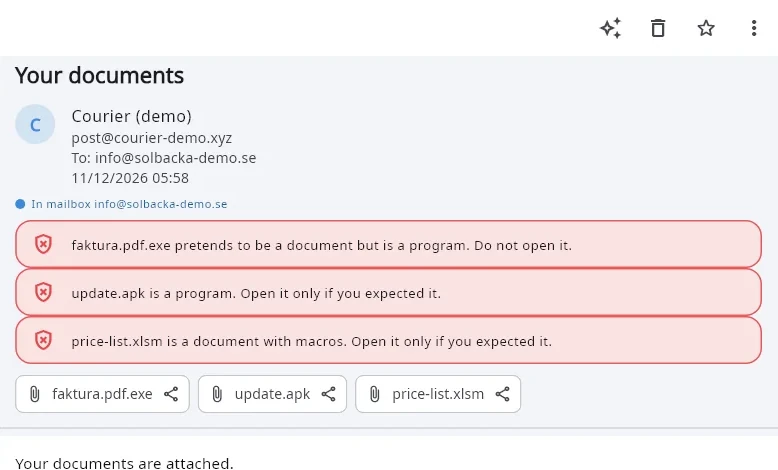
The link shows kvarnen-demo.se but really leads to login-check-demo.topRisky attachments
Programs and files with macros are marked before you open them.
faktura.pdf.exe is a program, not a PDFChanged bank details
The classic invoice trick: Mail asks you to call first.
New bank details from a new sender. Call to confirm before you pay.Typo in the address
Before sending, Mail notices an address that looks like a typo.
Did you mean gmail.com?Undo
Sent by mistake? Tap «Undo» and the letter stays with you.
Sending cancelledUndo

Only you open your mail
Mail has its own lock — fingerprint, face or PIN — and locks again a minute after you leave it. Screenshots and screen recording are blocked.
AES-256 in the app
Every saved letter is encrypted with AES-256-GCM, the mail database with SQLCipher. One random key per phone, kept in the Android Keystore.
Quiet notifications
While the app lock is on, new-mail notifications show only the number of unread letters per mailbox — no sender, no subject.
No copies in the cloud
The app's mail is not included in phone backups or device transfer, so it cannot leak through them.
Passwords stay on the phone
Mailbox passwords are kept in the Android Keystore. No account with us, nothing sent to us.
What encryption here does and does not mean
AES-256 protects the mail stored on your phone. On the way between phone and mail server the connection is encrypted (SSL/TLS). On the server itself your mail is as safe as your mail provider keeps it. This is not end-to-end encryption between people.
App against app: our mail app and the Gmail app
In the Gmail column we write only what Google says itself in Gmail Help. Every row has its link.
| Secure Email by UZYTAKUZYTAK | Gmail appGmail | |
|---|---|---|
| AdsAds | None | Yes — Google shows ads in Gmail Google Help |
| Pictures from the internet in a letterPictures | Off until you tap «Show pictures» | Shown automatically by default Google Help |
| Mailboxes of other providers (company, hosting)Other mailboxes | Added directly (IMAP/SMTP) | Still possible in the mobile app; Gmailify for such mailboxes ends in January 2027 Google Help |
Gmail Help pages checked on 11 November 2026. Gmail is a trademark of Google LLC; UZYTAK is not connected with Google.
All your mail in one place


One common spam folder
Spam of all mailboxes in one place — real customers land there too, so it is easy to check.
Reply from the right address
Answers go out from the mailbox the letter came to, with that mailbox's own signature.
Mailboxes from UZYTAK Vault
Keep your passwords in UZYTAK Vault? Pick the file, type the master password, and every mailbox is added and tested.
On Windows: all your mail of all years, and a helper that sorts it
The Windows version keeps a permanent archive of every mailbox on your PC, and a local AI that sorts letters and reminds you who waits for an answer.
See the Windows version
Premium backgrounds for your inbox
With Pro, your mail sits on calm photo backgrounds — a night sky, the sea, a misty forest, mountains and more — light ones for the day, dark ones for the night.









Free and Pro
Pay once. No subscription.
Free
0 €for good
- 1 mailbox
- Every protection switched on
- Warnings about typical scam tricks
- 7 days of Pro, whenever you want
Pro
9,99 €one time
- As many mailboxes as you like
- Premium backgrounds
- Your firm's brand on the lock screen
- One payment — no subscription
The price of Pro is shown in Google Play in your currency.
Not there yet — honestly
- Phone: Android only for now. iPhone and Mac are planned, not ready.
- Outlook.com and Hotmail need Microsoft sign-in — coming in a later version.
- Gmail and Google Workspace mailboxes connect with an app password.
- No scheduled sending and no conversation view yet.
Questions
Do you read or store my mail?
No. The app connects straight from your phone to your mail server. We have no server for your mail and no account with your data.
Which mailboxes work?
Any mailbox with IMAP and SMTP: company and hosting mail, Gmail and Google Workspace with an app password, GMX, Onet, WP, iCloud, Yahoo and others. Outlook.com and Hotmail need Microsoft sign-in, which comes later.
What if I lose my phone?
The app stays locked behind your fingerprint or PIN and the saved mail is encrypted. Change your mailbox passwords at your mail provider to cut the phone off.
Questions or a wish?
Write to us — a person answers.